


An update about yesterday’s downtime
As you might have noticed, viaLibri was offline for ten hours yesterday. In all the time I’ve been working for viaLibri I can’t remember a time when we’ve had to take the website down for that long.
We weren’t alone. As widely reported in the news, a vulnerability had been discovered in PHP, the programming language that powers viaLibri and (according to some estimates) over 70% of websites on the internet. Unusually, details of the flaw were shared widely before a fix had been released. Following the advice of several government agencies we decided to take the site offline until a patched version of PHP became available.
We realise this was a disruptive move for all of you, but the situation left us few alternative options. The vulnerability was so severe that it would have granted any attacker unfettered access to our servers, and the databases connected to them. We felt that protecting your data was more important than keeping the site online, and we hope you understand.
All our servers are now fully patched. We have checked our logs and found no sign of unauthorised access. As far as we can tell, your data is safe.
Got a thousand wants? We’ll import them for you
One of the best features of viaLibri is our saved search service, Libribot. Using this feature you can save sets of search criteria (which we call “wants”). Libribot will then check your wants against our search index several times a day and send you an email if any new matching items have come on sale.
Over 8,000 people use Libribot to make sure they’re the first to know when items they’re interested in hit the market. Most of those users have a small number of wants saved, but we’ve also got a growing number who have a thousand or more active wants.
Managing a wants list this long can get a little tricky, and it’s fair to say that our website’s user interface wasn’t designed with thousands of wants in mind. To make things easier, we’re more than happy to import wants lists for you manually. All you need to do is email us at support@vialibri.net and send us an Excel or CSV file containing the details of your wants. We can also give you a template file to fill in if that makes things easier. As it’s a manual process it’s not an instant import, but we aim to handle them within a couple of working days.

This import is a free service that we offer, and you can use no matter whether you’ve got a free or paid viaLibri account. For free viaLibri accounts Libribot will search one of your wants each day cycling through your wants over time. On a paid account, Libribot will check 100 or more of your wants every day.
So, if you’ve got a long list of items you’re looking for, why not get in touch with us and have Libribot do the work for you?
How to block particular booksellers
The ability to block particular sellers is a feature that our users regularly ask for. In fact, it’s been a feature of viaLibri for years, but it was only displayed if you were logged in to your viaLibri account. We’ve recently tweaked it so it’ll show for all users. However, you’ll still need to log in to actually use it.
Blocking booksellers
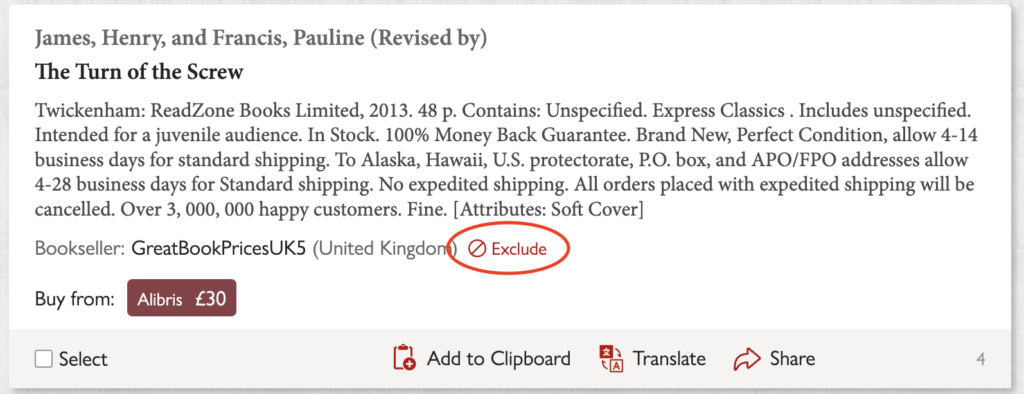
Next to every bookseller’s name in your search results you’ll see an “Exclude” link. Click it and that bookseller is added to your personal excluded booksellers list. From then on, none of their listings will show up in any of your future searches.
This exclusion list is used in normal search results and on Libribot, ensuring that you won’t see results from that seller anywhere on viaLibri. We’re also often able to spot when the same bookseller is listing under more than one name across different sites. When that happens, blocking them once will exclude all of their known aliases too, not just the one you clicked.
Managing your excluded booksellers list
Once you’ve blocked a seller, their name is added to a list you can review and edit at any time. You’ll find it on your Search Preferences page, which is in the account menu shown in the top right of every page. Changed your mind about someone? Just remove them from the list and their listings will start appearing in your results again.
eBay Spain is now available on viaLibri

We are pleased to announce that we have now added eBay Spain to the list of sites that are searched by viaLibri.
Fixed-price listings and auctions from eBay Spain will be included when you search via our website or use our saved search service, Libribot. If you add the details of an item to your Libribot wants list, then we will check several times a day to see if any matching eBay items have been added. We’ll then email you details of the new listing.
Ready to get started? Simply search as usual. eBay Spain results will now appear seamlessly alongside our other listings from more than 210 sites worldwide.